How to Bypass or Remove a BIOS Password by Removing the CMOS Battery:
The simplest way to remove a BIOS password is to simply remove the CMOS battery. A computer will remember its settings and keep the time even when it is turned off and unplugged because these parts are powered by small battery inside the computer called a CMOS battery. If we pull out this battery, the computer will forget alot of its hardware settings, including its BIOS password. This should not be performed on Laptops if you are not experienced working with laptop hardware.
The simplest way to remove a BIOS password is to simply remove the CMOS battery. A computer will remember its settings and keep the time even when it is turned off and unplugged because these parts are powered by small battery inside the computer called a CMOS battery. If we pull out this battery, the computer will forget alot of its hardware settings, including its BIOS password. This should not be performed on Laptops if you are not experienced working with laptop hardware.
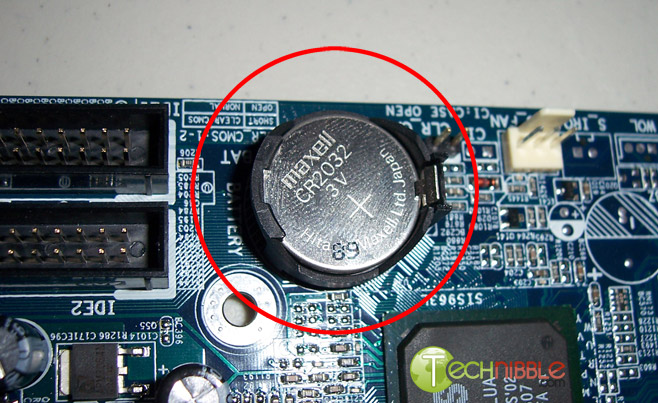 Anyway, open up the computer case using a screw driver and locate the flat, circular and metallic CMOS battery. It should look something like the picture to the right. Some computers have this part standing upright.
Once you have located it, observe how the latches are holding it. There are many different ways to remove a CMOS battery but the most common way on newer computers can be seen in the picture below.
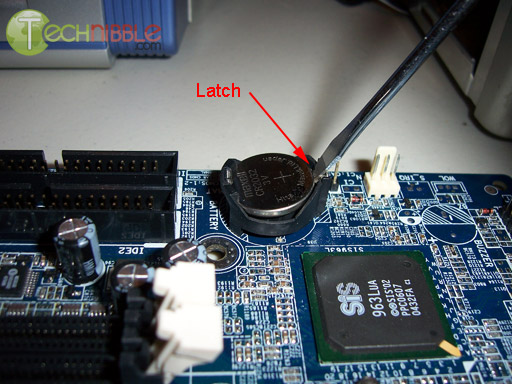
Make sure to power down the computer, unplug the power cables and unplug any USB devices if they are powered. The computer must not be able to get power from anywhere for this to work. Take out the CMOS battery and wait 10 – 25 minutes before putting it back in. The reason for this wait is because the computer can still store power in its capacitors even though everything is unplugged. The waiting period allows enough time for them to discharge.
Plug everything back in, power up the computer and enter the BIOS again. If everything went well there should be no more password. In some cases, if you get weird error messages during bootup now, you will need to goto “Load BIOS Defaults” in BIOS and save the changes to fix them.
If this method didn’t work, try one of the methods below.
How to Bypass or Remove a BIOS Password using Software:
!BIOS is a freeware utility which is designed to be a whole BIOS and security suite. It has the ability to decrypt the passwords used in some of the most common BIOS makes such as Award, Phoenix, American Megatrends, IMB etc..
It also has the ability to brute force the password (known as “blasters”). However, this method is dangerous and can result in some unexpected and unwanted results.
!BIOS is a freeware utility which is designed to be a whole BIOS and security suite. It has the ability to decrypt the passwords used in some of the most common BIOS makes such as Award, Phoenix, American Megatrends, IMB etc..
It also has the ability to brute force the password (known as “blasters”). However, this method is dangerous and can result in some unexpected and unwanted results.
Note: Because of this applications password cracking abilities, some antivirus software may report it as a virus/trojan. This is a false positive.
To start using !BIOS, reboot your computer and take note of the BIOS type and version you are running. For example, If your motherboard uses Award BIOS you should look for the text “Award Medallion BIOS 6.0″ or something similar.
Download !BIOS from here and save it to your desktop. Then, open a DOS command windows by going toStart > Run and type: cmd
Once you see a black screen in front of you, type: cd desktop
You should now see something like: C:\Documents and Settings\YourUserName\Desktop>
You should now see something like: C:\Documents and Settings\YourUserName\Desktop>
Now type the name of the file you just downloaded, if you haven’t changed the name just type in: bios320.exe
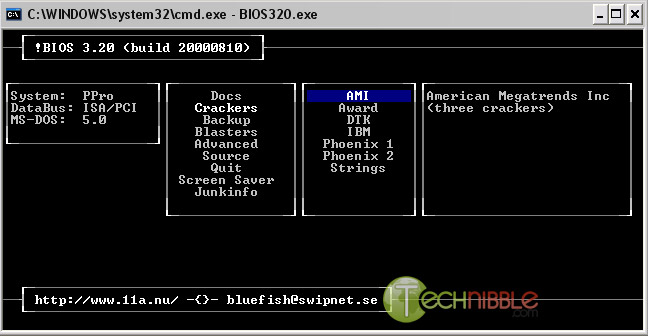
Use the down arrow and choose “Crackers” and then press the right arrow. Using the up and down arrows, select the BIOS that the motherboard is using and press Enter.
You should now see a menu asking what you want to crack, in most cases its the Supervisor or System Passwords you want to crack, so press the 1 key on your keyboard. It will then show you another menu asking how you want it to be cracked. Option 1 is pretty good so try that first by pressing the 1 key on your keyboard. You should now have your BIOS password.
Reboot the computer, enter the BIOS and try it out.
How to Bypass or Remove a BIOS Password using the manufacturer backdoor password:
On many computers (especially old ones), computer manufacturers build in backdoor passwords for their own technicians to use so they can access the BIOS when the hardware is being serviced. Here are some of the ones that have been reported. You may need to try quite a few passwords before you find one that works
These passwords are CaSe SeNsItIve.
AMI BIOS Backdoor Passwords:
- A.M.I.
- AAAMMMII
- AMI
- AMI?SW
- AMI_SW
- BIOS
- CONDO
- HEWITT RAND
- LKWPETER
- MI
- Oder
- PASSWORD
Award BIOS Backdoor Passwords:
- (eight spaces)
- 01322222
- 589589
- 589721
- 595595
- 598598
- ALFAROME
- ALLY
- ALLy
- aLLY
- aLLy
- aPAf
- award
- AWARD PW
- AWARD SW
- AWARD?SW
- AWARD_PW
- AWARD_SW
- AWKWARD
- awkward
- IOSTAR
- CONCAT
- CONDO
- Condo
- condo
- d8on
- djonet
- HLT
- J256
- J262
- j262
- j322
- j332
- J64
- KDD
- LKWPETER
- Lkwpeter
- PINT
- pint
- SER
- SKY_FOXSYXZ
- SKY_FOX
- syxz
- SYXZ
- TTPTHA
- ZAAAADA
- ZAAADA
- ZBAAACA
- ZJAAADC
Russian Award BIOS Passwords:
- %øåñòü ïpîáåëîâ%
- %äåâÿòü ïpîáåëîâ%
Phoenix Backdoor BIOS Passwords:
- BIOS
- CMOS
- phoenix
- PHOENIX
Other Manufcaturers Backdoor Passwords: (manufacturer name – password)
- VOBIS and IBM – merlin
- Dell – Dell
- Biostar – Biostar
- Compaq – Compaq
- Enox – xo11nE
- Epox – central
- Freetech – Posterie
- IWill – iwill
- Jetway – spooml
- Packard Bell – bell9
- QDI – QDI
- Siemens – SKY_FOX
- SOYO – SY_MB
- TMC – BIGO
- Toshiba – Toshiba


