Jarlsberg – Learn Web Application Exploits and Defenses

This codelab is built around Jarlsberg /yärlz’·bərg/, a small, cheesy web application that allows its users to publish snippets of text and store assorted files. “Unfortunately,” Jarlsberg has multiple security bugs ranging from cross-site scripting and cross-site request forgery, to information disclosure, denial of service, and remote code execution. The goal of this codelab is to guide you through discovering some of these bugs and learning ways to fix them both in Jarlsberg and in general.
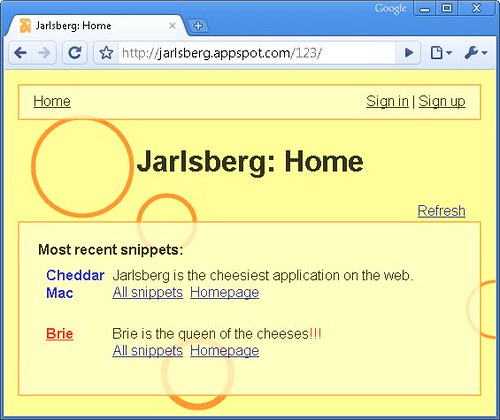
Jarlsberg Vulnerable Web Application

The codelab is organized by types of vulnerabilities. In each section, you’ll find a brief description of a vulnerability and a task to find an instance of that vulnerability in Jarlsberg. Your job is to play the role of a malicious hacker and find and exploit the security bugs. In this codelab, you’ll use both black-box hacking and white-box hacking. In black box hacking, you try to find security bugs by experimenting with the application and manipulating input fields and URL parameters, trying to cause application errors, and looking at the HTTP requests and responses to guess server behavior. You do not have access to the source code, although understanding how to view source and being able to view http headers (as you can in Chrome or LiveHTTPHeaders for Firefox) is valuable. Using a web proxy like Burp or WebScarab may be helpful in creating or modifying requests. In white-box hacking, you have access to the source code and can use automated or manual analysis to identify bugs. You can treat Jarlsberg as if it’s open source: you can read through the source code to try to find bugs. Jarlsberg is written in Python, so some familiarity with Python can be helpful.

However, the security vulnerabilities covered are not Python-specific and you can do most of the lab without even looking at the code. You can run a local instance of Jarlsberg to assist in your hacking: for example, you can create an administrator account on your local instance to learn how administrative features work and then apply that knowledge to the instance you want to hack. Security researchers use both hacking techniques, often in combination, in real life.

If you wish to test the hosted version of Jarlsberg you can do so here:

http://jarlsberg.appspot.com/start

iScanner – Detect & Remove Malicious Code/Web Pages Viruses From Your Linux/Unix Server

iScanner is free open source tool lets you detect and remove malicious codes and web pages viruses from your Linux/Unix server easily and automatically. This is a neat tool for those who have to do some clean up operation after a mass-exploitation or defacement on a shared web-host.

This tool is programmed by iSecur1ty using Ruby programming language and it’s released under the terms of GNU Affero General Public License 3.0.

Features

  • Detect malicious codes in web pages. This include hidden iframe tags, javascript, vbscript, activex objects and PHP codee.
  • Extensive log shows the infected files and the malicious code.
  • Send email reports.
  • Ability to clean the infected web pages automatically.
  • Easy backup and restore system for the infected files.
  • Simple and editable signature based database.
  • Ability to update the database and the program easily from dedicated server.
  • Very flexible options and easy to use.
  • Fast scanner with good performance.

Gmail sign up, Gmail login problem partially solved: Apps Status Dashboard

Gmail sign up, Gmail login problem has been partially solved. The Gmail users who were not able to login due to the Gmail login error, the mail service has been restored for some of them. The partial resolution of Gmail sign up, Gmail login has been officially reported by Google on its Apps Status Dashboard. Google expect to restore services for all affected users, however did not indicate any time frame.

The satisfactory news is that personal data, mails and other information of all the affected users is safe and secure. However Gmail sign up, Gmail login issues from Google surely comes as surprise and disappointment to many. The Gmail sign up, Gmail login error is categorized by Google as "Service disruption"


in its official dashboard. It has been almost 24 hours Google is trying to resolve this problem.

Google has been regualrly providing update on the Gmail sign up, Gmail login problem. In its one of the latest update on Google Apps Status Dashboard on restroration of Gmail services for some users it said, "Google Mail service has already been restored for some users, and we expect a resolution for all users in the near future. Please note this time frame is an estimate and may change."

Expressing apology for the Gmail login problem, it further added, "The problem with Google Mail should be resolved. We apologize for the inconvenience and thank you for your patience and continued support."

Some of the users faced problem in Gmail sign up, Gmail login on May 11. The Google server showed 502 error and requested users to retry after 30 seconds. Google is yet to identify and announce the reason for the error which affected Gmail users across the globe.

For more update on Gmail sign up, Gmail login problem, please visit Google Apps Status Dashboard at http://www.google.com/appsstatus#rm=1&di=1&hl=en